Interfacing Teletypes and Paper Tape · Volume 5
Interfacing Teletypes and Paper Tape — Vol 5: A Real Machine on the Air
RTTY.COM and its archive, terminal units old and new, putting a teleprinter between an HF rig's audio and its keying line, and a worked example: printing the ITTY news on a real teletype.
5.1 What changes when the machine is real
RTTY on the Air explains the mode: two tones 170 Hz apart, 45.45 baud, the terminal unit that turns them into mark and space, and the crossed-banana tuning display. Modern Digital and the Raspberry Pi explains how a sound card and fldigi do the whole job on a screen. This volume is about the station in between, the one in my father’s shack: a radio, a terminal unit, a loop, and a teleprinter hammering out whatever the band brings in.
Three things change when the printer is a machine instead of a window on a screen.
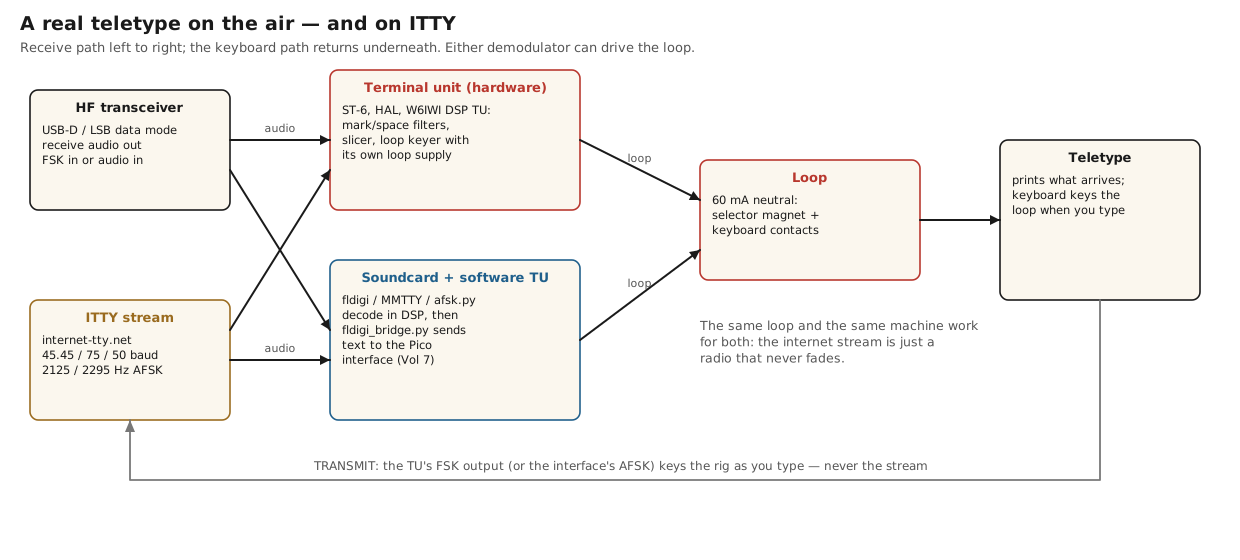
- Something has to drive the loop. A screen needs text; a teletype needs 60 mA switched at 45.45 baud. Either a terminal unit keys the loop directly, or software decodes the signal and an interface (Vols 3 and 7) keys the loop.
- The keyboard has to key the transmitter. The operator types on the teletype, so the loop current from the keyboard must become either audio tones (AFSK) or a frequency-shift keying line (FSK) for the rig.
- The motor runs only when there is something to print. A Model 15 left running all night is loud and wears itself out, so a real station switches the motor when a signal appears and when it goes away.
5.2 RTTY.COM: the archive
Before building any of this, a newcomer should spend an evening at RTTY.COM, “The Radio Teletype Reference & Archive”, at rtty.com, which now redirects to rtty.internet-tty.net. It is a non-commercial archive of radio teletype and Baudot teletype history, art, equipment and documentation, established in 1998, which calls itself “the internet’s oldest RTTY resource”. Its footer says it plainly: “Non-commercial archive. No advertising. No tracking.” It is hosted through SDF.org.
The people behind it are part of the story. RTTY.COM was founded by George Hutchison, W7TTY, now a Silent Key. Bill Bytheway, K7TTY, wrote its original software, including the 1999 Java viewer that first put its art collection online. Tom Tillson, WB2TTY, looks after content and operations, and Paul Heller, W2TTY, of Arvada, Colorado, is the current owner and maintainer, responsible for its infrastructure, software and website; the ITTY streams come from Arvada.
What is there, and where:
- History (history.html), and Teletype Corporation’s own “The Teletype Story” as a PDF (downloads/teletype-story.pdf).
- Equipment (equipment.html): teletype machines and tape equipment including transmitter-distributors (equipment-teletype.html); terminal units and demodulators (equipment-tu.html); service documents (equipment-service.html); and the Kretzman Technical Library, named for Byron W. Kretzman, W2JTP, a name every reader of the old RTTY handbooks will know.
- Irvin Hoff’s “Introduction to Amateur Radio Teletype” (equipment/literature/introduction.htm), by the designer of the Mainline terminal units, written for exactly the reader of this volume.
- RTTY Art (gallery.html): 155 files of Baudot character art from the 1960s to the 1980s, made by overstriking (Vol 6).
- ITTY (itty.html), the live streams below; Telex, Resources (software and tools), Videos, and Community, which points to the GreenKeys mailing list.
5.3 Terminal units, then and now
RTTY.COM’s terminal-unit page is a compact history of the boxes that sat between the receiver and the loop. It starts with the tube-era W2JAV demodulator, whose mark-hold and autostart adapter “shuts off the teletype motor when no mark signal is present”, and the Alltronics Model-A and W5HFZ-W5RJG converters of 1955. It runs through the Mainline family designed by Irvin Hoff: the TT/L of 1964, the ST-3, ST-5 and ST-6 of 1970, and the UT-2 and its UT-4 buffer of 1975. It ends with factory-built units such as the Data Technology Associates DT-500/DT-600 of 1977 and the Frederick Electronics 1632.
The ST-6, built in kit form by HAL Communications, shows what a complete terminal unit had to do, and its manual is worth reading for that reason alone:
- Demodulate. Mark and space filters, a limiter and a slicer (RTTY on the Air, Vol 2).
- Drive the loop. “A 175 volt, 60 ma loop supply is included in the demodulator”, keyed by a high-voltage transistor (Vol 2 of this dive covers the heat, and the danger).
- Run the motor. Its autostart detects a signal, enables the loop and switches the printer motor on, and when the signal goes away the motor is shut off again after a delay; with the motor off, the loop current is removed too. A mark-hold keeps the loop marking when there is no signal, so the machine does not run open on noise.
- Key the transmitter. “A low-voltage keying source is provided at the FSK jack for driving FSK or AFSK keyer stages”, nominally −15 V for mark and +15 V for space, derived from the loop current, so the teletype’s keyboard keys the rig through the same box.
- Stand by. A standby mode, also selectable from a remote jack, holds the keyer in “local-loop” configuration so that the operator can prepare tape or type locally on the loop supply without the demodulator interfering.
The later HAL ST-5000 adds an audio tone keyer that generates the same tone pair for AFSK transmitting, plus an extra narrow-shift tone for the Morse identification the law requires.
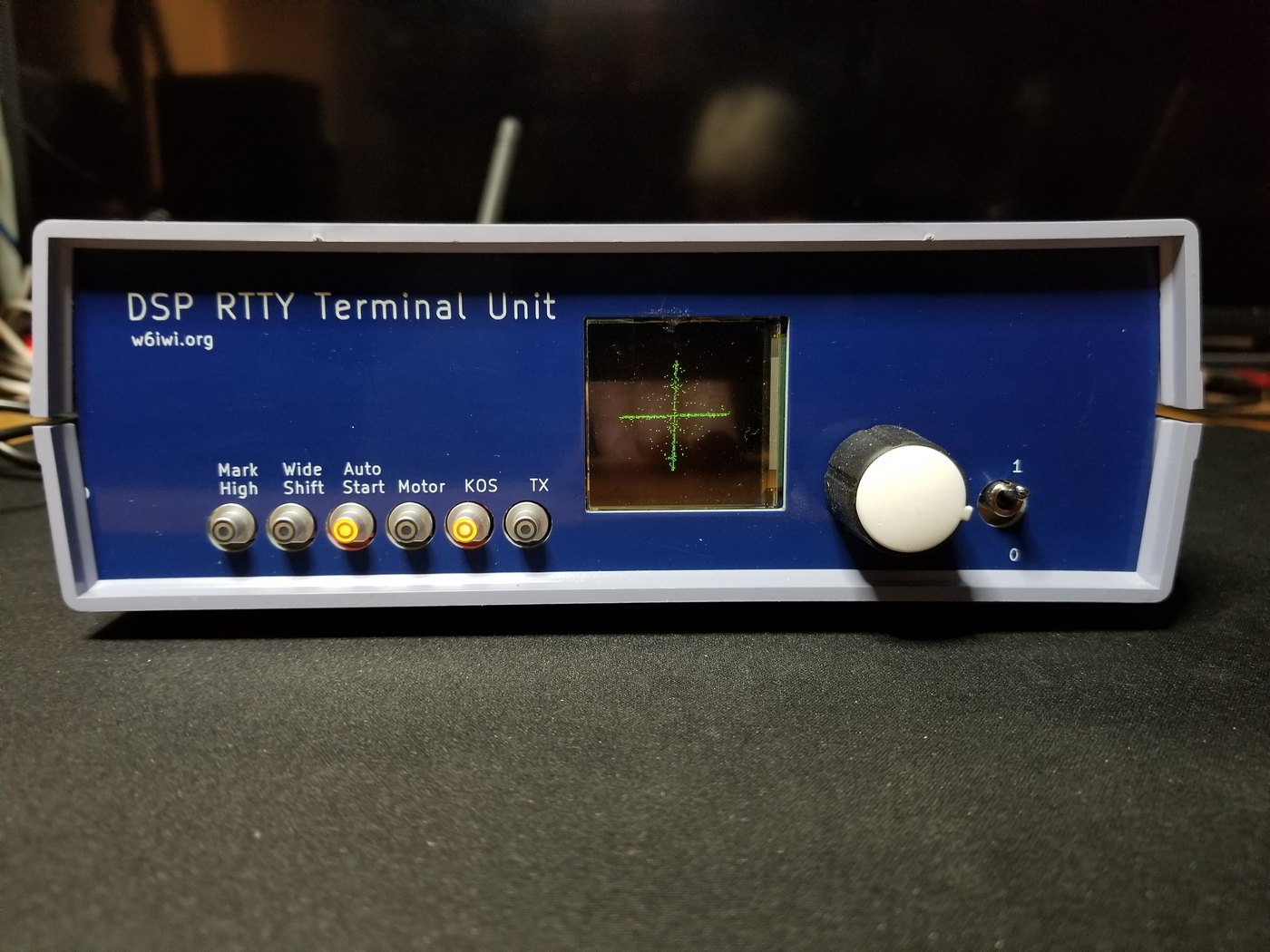
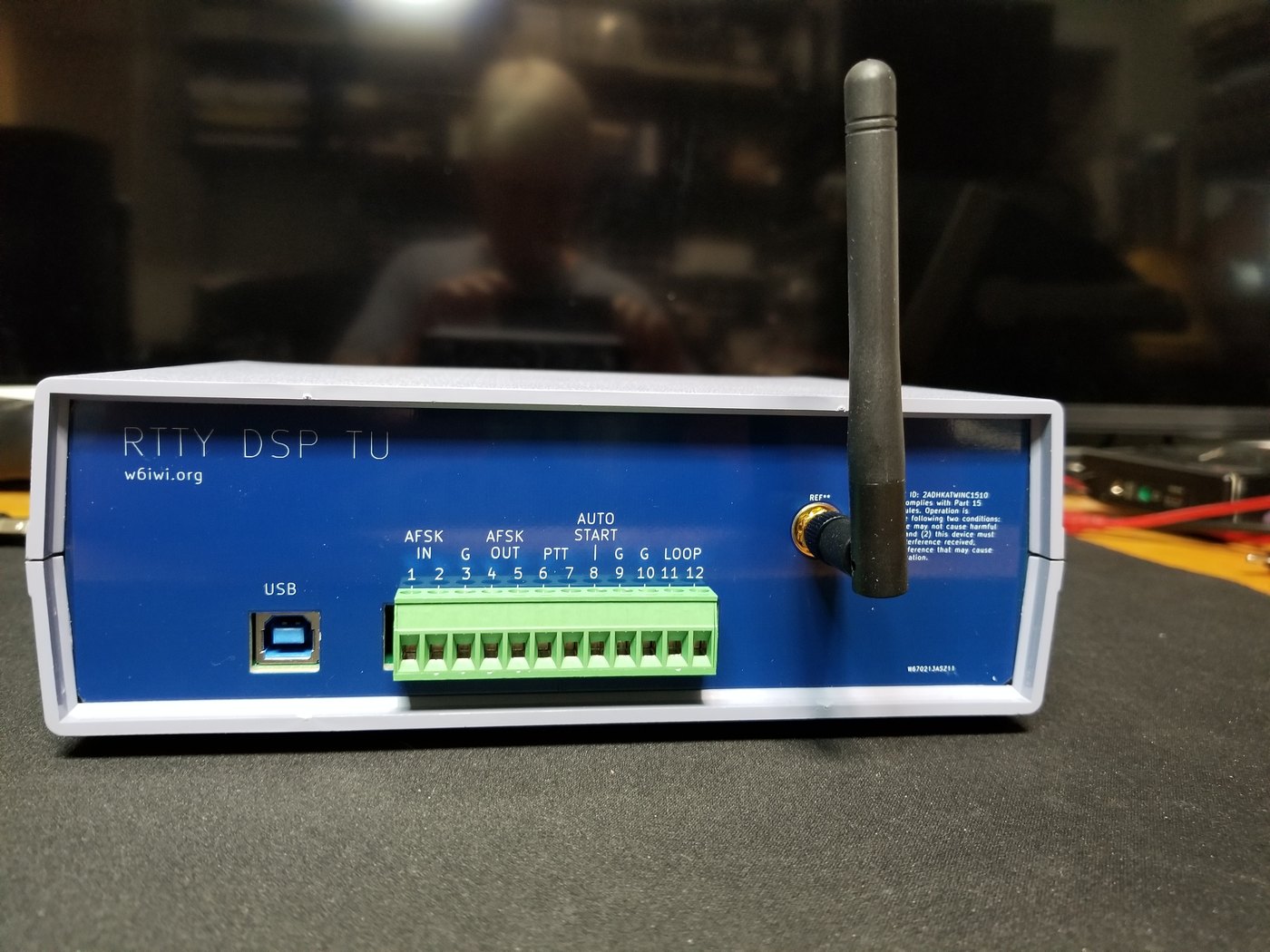
The modern terminal unit. Harold Hallikainen, W6IWI, has published a DSP terminal unit that is the ST-6’s direct descendant. It “largely emulates an analog terminal unit” but uses DSP biquad filters, with tone filters whose bandwidth is “1.7 times the baud rate”, a software UART, a direct-digital-synthesis AFSK generator at an 8 kHz sample rate, and 60 mA loop keying and sensing on the back panel (Vol 3 discussed its contact-bounce filter). The KiCad files are on GitHub, and bare or assembled boards are available through PCBWay.
The other modern routes need no separate box. The DeRamp board has an AFSK input, line level at 2125 and 2295 Hz on a 3.5 mm jack, and demodulates it itself (Vol 2). And a software terminal unit — fldigi, MMTTY, minimodem, or this dive’s afsk.py — decodes the audio on a computer and hands the text to a loop interface. The machine then only prints; the decoding is done by the computer, which on a weak signal is the better demodulator.
5.4 Connecting to an HF rig
The details of RTTY operating are in RTTY on the Air; what follows is only what changes with a machine in the loop.
Receive audio. Take audio from the rig’s line or data output, or its USB audio device, at a modest level, not from the speaker after the volume control. A hardware TU wants a few hundred millivolts; the DeRamp AFSK input wants line level.
Tones and sideband. The amateur convention is 2125 Hz mark and 2295 Hz space, 170 Hz shift, with the rig on lower sideband or its data mode set to the equivalent. RTTY on the Air, Vol 1, explains why the sideband matters (“the sideband trap”). If the machine prints nonsense on a strong, clean signal, try the TU’s reverse switch, or afsk.py --reverse, before anything else.
Transmit, two ways.
- AFSK. The TU’s tone keyer, the W6IWI unit’s DDS generator or a sound card produces the two tones, which go into the rig’s data input with the rig in its data or SSB mode. This works with any rig.
- FSK. The rig has an FSK keying input and generates the shift itself; the TU’s FSK output or the interface’s logic keys it. Modern rigs implement this input differently, so read the manual for the rig in question. The safe general rule is to drive any rig keying line through an optocoupler or a transistor, never directly from a loop.
Push-to-talk and identification. The transmitter must key up when the operator starts typing and drop when they stop, by a PTT line from the TU or the interface, or by the rig’s VOX on AFSK. The station must identify; an RTTY station may do it in RTTY or in Morse, which is why the ST-5000 has its CW identification tone. Since the FCC’s 2023 order (FCC 23-93) the old 300 baud symbol-rate limit on HF data has been replaced by a 2.8 kHz bandwidth limit (Wireless Modes, The Shift-Keying Family); 45.45 baud RTTY is far inside both.
Motor control. Use the TU’s autostart, or let the computer do it: the Pico interface switches the motor through an enclosed relay when copy starts and turns it off after a minute of silence (Vol 7).
5.5 Printing the ITTY news on a real teletype
The teletypes in my father’s shack printed whatever came in on the bands. A boy could stand and watch the news arrive a character at a time, from somewhere far away, with nobody touching the keys. That experience is still available, every hour of every day, because of RTTY.COM’s ITTY.
ITTY (Internet Teletype) is a free, round-the-clock live audio stream of Baudot RTTY from Arvada, Colorado, made for real machines to print, with no login. It sends out news in the old wire-service style precisely so that teleprinters have something to print. The channels, as listed on the ITTY page on 3 November 2026:
Table 1 — ITTY (Internet Teletype) is a free, round-the-clock live audio stream of Baudot RTTY from Arvada, Colorado, made for real machines to print, with no login. It sends out news in the old wire-service style precisely so that teleprinters have something to print. The channels, as listed on the ITTY page on 3 November 2026
| Channel | Speed | Tones | Stream | What it carries |
|---|---|---|---|---|
| ITTY | 60 wpm, 45.45 baud | 2125 / 2295 Hz, 170 Hz shift | internet-tty.net:8000/ITTY | wire-service news articles, loaded daily |
| ITTY 100 | 100 wpm, 75 baud | 2125 / 2295 Hz | internet-tty.net:8010/ITTY100 | the same news, faster |
| ITTY Europe | 66 wpm, 50 baud | 1275 / 1445 Hz | internet-tty.net:8040/EUROPE | European news from RSS feeds |
| AUTOSTART | 60 wpm, 45.45 baud | 2125 / 2295 Hz | internet-tty.net:8030/AUTOSTART | a daily “This Day in History” bulletin, articles sent in by users, and selected GreenKeys messages |
The streams are ordinary MP3 audio. The internet is simply a radio that never fades, and the chain to print them is the radio chain with the receiver replaced by a computer’s audio output.
Path 1: a hardware terminal unit. Play the stream on a computer and connect its audio output to the TU’s input. Set the TU to 170 Hz shift, normal (not reversed). The TU keys its loop and the machine prints. The AUTOSTART channel exists for TUs with autostart: when copy begins the motor starts, and when it ends the motor stops. RTTY.COM’s own instructions describe exactly this: “route the stream audio to an FSK demodulator (terminal unit) set to 170 Hz shift” and connect its loop output to the machine.
Path 2: software, and the Pico interface. ITTY’s page names MMTTY and fldigi as decoders, with a virtual audio cable to carry the stream into them (VB-Cable on Windows, BlackHole on macOS, JACK on Linux); fldigi_bridge.py then sends fldigi’s decoded text to the teletype. On Linux the whole chain can also be a single pipeline, with GStreamer fetching and decoding the MP3 to 8 kHz audio and this dive’s afsk.py acting as the terminal unit:
gst-launch-1.0 -q souphttpsrc location=http://internet-tty.net:8000/ITTY \
    ! decodebin ! audioconvert ! audioresample \
    ! audio/x-raw,format=S16LE,channels=1,rate=8000 ! fdsink fd=1 \
  | python3 afsk.py rx - --rate 8000 > /dev/ttyACM0
/dev/ttyACM0 is the Pico interface of Vol 7, which takes ASCII over USB, converts it to Baudot and keys the loop at 45.45 baud. With a plain five-bit serial port instead, pipe the text through tty_send.py.
The decoder half of that pipeline was tested on the live stream while this volume was being written. Forty-five seconds of the 60 wpm channel, captured on 3 November 2026, decoded with no errors at all; a sample of the copy, as a teletype would have printed it:
    YOU PICK: THE WALL STREET JOURNAL HAS A DETAILED LOOK AT STATE-
BY-STATE FORECASTS, AND ITS TOOL ALLOWS READERS TO MAKE THEIR OWN
PROJECTIONS.
The same capture decoded with --reverse produced pure garbage, which is a useful thing to have seen once: that is what a sideband or polarity mistake looks like.
Path 3: the DeRamp board. Feed the computer’s headphone output straight into the DeRamp board’s AFSK input. The board demodulates the stream and drives the Model 15 itself.
A test signal as well as a newspaper. ITTY is clean, continuous, and exactly at the machine’s speed, so it is the best test signal a restorer has. A range taken on ITTY (Inside the Teletype Mechanism, Vol 1) measures the machine and the interface, not the band conditions, and an interface that narrows the range on ITTY is distorting the signal.
I do not yet have a teletype to print it on. When I do, the first thing I want it to print is the ITTY news, unattended, the way the machines in my father’s shack did.
Next: Vol 6, paper tape in and out of the computer.
5.5.1 Sources (Vol 5)
- RTTY.COM: description, founding date (1998), “the internet’s oldest RTTY resource”, “Non-commercial archive. No advertising. No tracking.”, SDF.org hosting, the people (George Hutchison W7TTY, founder, Silent Key; Bill Bytheway K7TTY, original software; Tom Tillson WB2TTY, content and operations; Paul Heller W2TTY, owner and maintainer), and section pages. https://rtty.internet-tty.net/ (rtty.com redirects there); read 3 November 2026.
- Terminal-unit history (W2JAV autostart and mark-hold; Alltronics Model-A and W5HFZ-W5RJG 1955; Mainline TT/L 1964, ST-3/ST-5/ST-6 1970, UT-2/UT-4 1975; DT-500/DT-600 1977; Frederick 1632). RTTY.COM, “Terminal Units & Demodulators.” https://rtty.internet-tty.net/equipment-tu.html
- RTTY art: 155 files of Baudot character art, overstrike, Bytheway’s 1999 Java viewer. https://rtty.internet-tty.net/gallery.html
- ITTY channels, tones, streams, content and printing instructions, including the decoder and virtual-audio-cable advice. RTTY.COM, “ITTY.” https://rtty.internet-tty.net/itty.html
- HAL ST-6 manual: 175 V 60 mA loop supply; autostart and motor shut-off; mark-hold; standby and local loop; FSK keying source (mark −15 V, space +15 V into 1 kΩ). https://navy-radio.com/rtty/hal/st6/manual/ST6_Manual.pdf (Internet Archive copy).
- HAL ST-5000 manual: tone keyer with an additional narrow-shift tone for Morse identification; 175 V 60 mA loop supply. https://navy-radio.com/rtty/hal/st5000/manual/ST5000_Manual.pdf
- W6IWI DSP terminal unit: biquad tone filters at 1.7 × baud rate, software UART, DDS AFSK at 8 kHz, 60 mA loop, KiCad on GitHub, PCBWay boards; photographs. https://w6iwi.org/rtty/DspTU3/ ; https://www.pcbway.com/project/shareproject/DSP_Terminal_Unit_for_RTTY_f7e5daa3.html
- DeRamp AFSK input (2125/2295 Hz, line level, 3.5 mm). https://deramp.com/model15_interface.html
- FCC 23-93 (symbol-rate limit replaced by 2.8 kHz bandwidth, effective 8 January 2024): see Wireless Modes sources in this project.
- ITTY decode test, 3 November 2026: 45 s of
internet-tty.net:8000/ITTYcaptured with GStreamer and decoded by03-outputs/tools/afsk.py(no errors in normal polarity; garbage with--reverse). - Cross-links: RTTY on the Air, Vols 1–2; Modern Digital and the Raspberry Pi; The Teletype Model 15, Vols 5–6 (RTTY.COM and ITTY for that machine), https://dots-and-dashes.fubsypoly.com/teletype-model-15/