Interfacing Teletypes and Paper Tape · Volume 4
Interfacing Teletypes and Paper Tape — Vol 4: Talking to a Computer — the Software
The start-stop character and its odd speeds, ITA2 and US-TTY, the LTRS/FIGS dance and unshift-on-space, getting 45.45 baud out of Linux, a USB chip or a Pico's PIO, the programs that drive teletypes today, and how the ASCII machines differ.
4.1 The character on the wire
A teleprinter character is a start-stop frame, and every piece of software in this volume exists to produce or consume that frame at exactly the right speed.
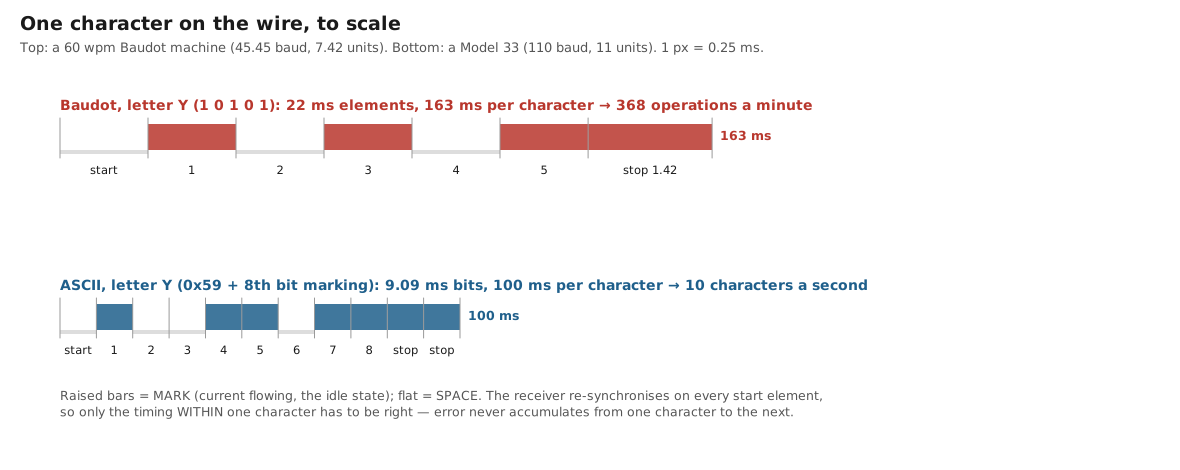
The five-unit frame is:
- a start element, one unit of space, which trips the receiving selector (Inside the Teletype Mechanism, Vol 1);
- five data elements, one unit each, element 1 first;
- a stop element of mark, at least as long as the machine needs to finish its cycle. On the classic Teletype machines it is 1.42 units, so a character occupies 7.42 units.
The stop element is where most software goes wrong. A receiving teletype restarts its timing at every start element, so it does not care how long the stop element is as long as it is long enough. Software that sends only one stop unit sends characters faster than the machine can print them:
45.45 baud, 1 stop     ->  45.45 x 60 / 7.0  = 390 characters a minute   (faster than the design rate)
45.45 baud, 1.42 stop  ->  45.45 x 60 / 7.42 = 368 operations a minute   (the machine's own speed)
45.45 baud, 1.5 stop   ->  45.45 x 60 / 7.5  = 364                       (safe)
45.45 baud, 2 stop     ->  45.45 x 60 / 8.0  = 341                       (safe, 7 % slower)
One and a half or two stop bits are always safe; one is a gamble. The DeRamp board offers 7.0-unit timing as an option, and its author notes that “most any machine will run fine at 7.0 on a short clean loop”, but 7.42 is its default and “the most common timing”. HeavyMetal’s frequently asked questions make the diagnosis from the other end: garbled copy like “RYRYGYG” is “almost surely an error with the stop bits”, and the advice is to try two.
The standard speeds, named by the words per minute the machine was geared for:
Table 1 — The standard speeds, named by the words per minute the machine was geared for
| Speed | Baud | Element | Operations/min (7.42 units) | Where it is used |
|---|---|---|---|---|
| 60 wpm | 45.45 | 22.0 ms | 368 | US standard; Model 15, 19, 28; amateur RTTY; ITTY |
| 66 wpm | 50 | 20.0 ms | 404 | European telex (TW39); ITTY Europe |
| 75 wpm | 56.88 | 17.6 ms | 460 | US 75-speed gearing |
| 100 wpm | 74.2 | 13.5 ms | 600 | high-speed gearing; ITTY 100 uses 75 baud |
| Model 33 | 110 | 9.09 ms | 600 (11 units) | ASCII terminals |
The epvuc usb-tty firmware lists the same four Baudot rates, as 45.45, 50.00, 56.90 and 74.20 baud (The Teletype Model 15, Vol 6). The small disagreements in the second decimal place do not matter: a teletype tolerates a few per cent of speed error, and its timing never accumulates past one character.
4.2 ITA2 and US-TTY
The five-unit code has 32 combinations. Two of them, LTRS (all five elements marking) and FIGS, are shift codes, and the other thirty mean one thing in letters case and another in figures case. The letters case is the same everywhere. The figures case comes in two common versions: ITA2, the international standard, and US-TTY, the American variant fitted to most US communications machines.
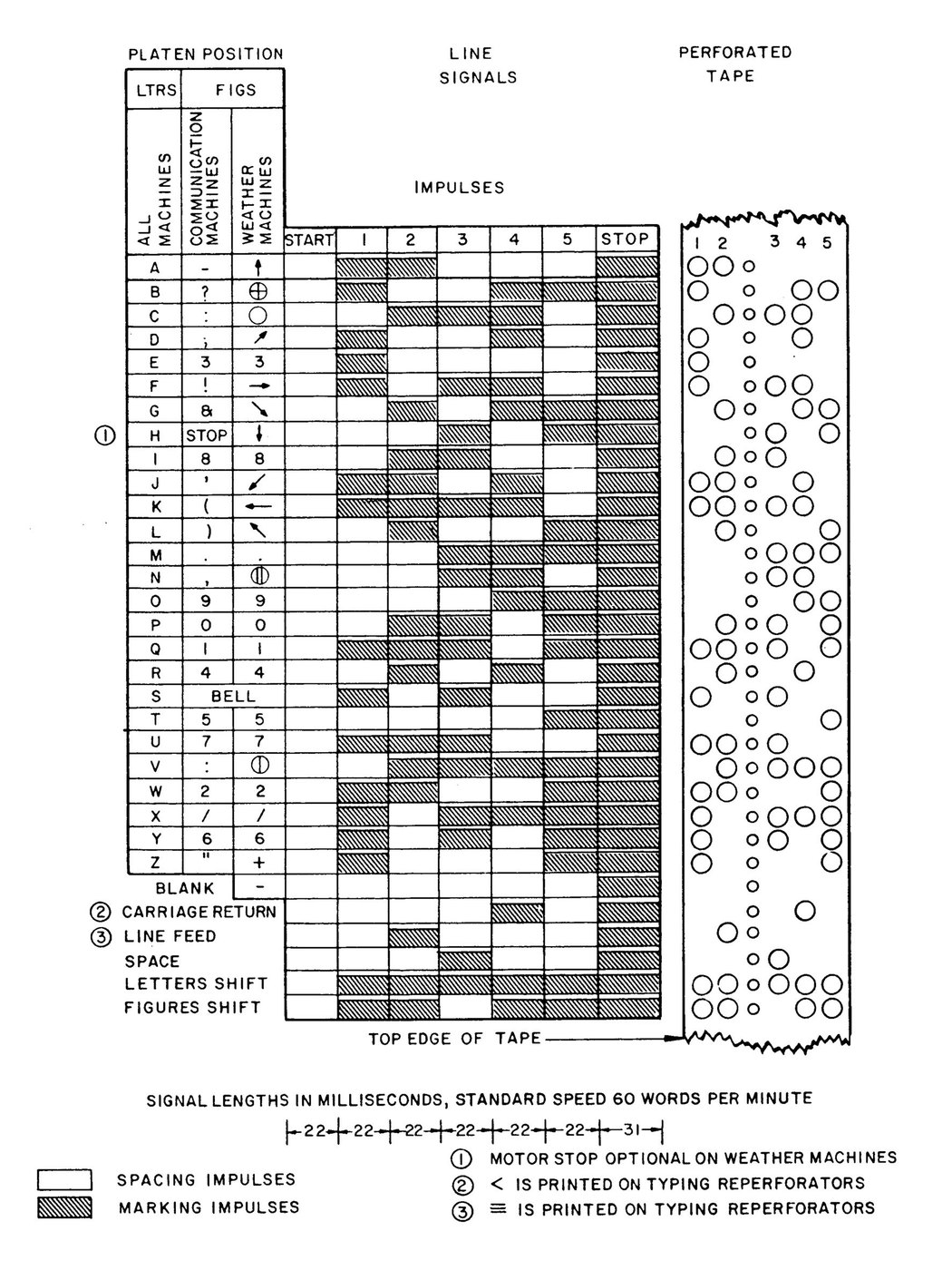
The table below is generated from 03-outputs/tools/baudot.py, whose tables were cross-checked against Wikipedia’s ITA2 and US-TTY tables and G. Heinz’s independent code chart. “Elements 1–5” is the order of transmission; the hex value treats element 1 as the least-significant bit, which is also the order a UART sends. The tape column uses the Teletype numbering, with the feed holes between levels 2 and 3.
Table 2 — ITA2 and US-TTY
| Hex | Elements 1–5 | Tape (1 2 · 3 4 5) | Letters | US-TTY figures | ITA2 figures | Hex | Elements 1–5 | Tape | Letters | US-TTY | ITA2 | |
|---|---|---|---|---|---|---|---|---|---|---|---|---|
00 | 00000 | ·· ··· | blank | — | — | 10 | 00001 | ·· ··● | T | 5 | 5 | |
01 | 10000 | ●· ··· | E | 3 | 3 | 11 | 10001 | ●· ··● | Z | ” | + | |
02 | 01000 | ·● ··· | LF | LF | LF | 12 | 01001 | ·● ··● | L | ) | ) | |
03 | 11000 | ●● ··· | A | - | - | 13 | 11001 | ●● ··● | W | 2 | 2 | |
04 | 00100 | ·· ●·· | SP | SP | SP | 14 | 00101 | ·· ●·● | H | # | national use | |
05 | 10100 | ●· ●·· | S | BEL | ’ | 15 | 10101 | ●· ●·● | Y | 6 | 6 | |
06 | 01100 | ·● ●·· | I | 8 | 8 | 16 | 01101 | ·● ●·● | P | 0 | 0 | |
07 | 11100 | ●● ●·· | U | 7 | 7 | 17 | 11101 | ●● ●·● | Q | 1 | 1 | |
08 | 00010 | ·· ·●· | CR | CR | CR | 18 | 00011 | ·· ·●● | O | 9 | 9 | |
09 | 10010 | ●· ·●· | D | $ | WRU | 19 | 10011 | ●· ·●● | B | ? | ? | |
0A | 01010 | ·● ·●· | R | 4 | 4 | 1A | 01011 | ·● ·●● | G | & | national use | |
0B | 11010 | ●● ·●· | J | ’ | BEL | 1B | 11011 | ●● ·●● | FIGS | — | — | |
0C | 00110 | ·· ●●· | N | , | , | 1C | 00111 | ·· ●●● | M | . | . | |
0D | 10110 | ●· ●●· | F | ! | national use | 1D | 10111 | ●· ●●● | X | / | / | |
0E | 01110 | ·● ●●· | C | : | : | 1E | 01111 | ·● ●●● | V | ; | = | |
0F | 11110 | ●● ●●· | K | ( | ( | 1F | 11111 | ●● ●●● | LTRS | — | — |
Three practical notes on the table:
- R is
01010and Y is10101. They are exact complements, which is why RYRYRY is the universal test text (Restoring a Teletype, Vol 2): it exercises every element in both states. - The US-TTY and ITA2 tables disagree on BEL, the apostrophe,
$/WRU,"/+and;/=. A machine with a US-TTY type box printing ITA2 traffic rings its bell instead of printing apostrophes. Software must know which the machine has; most US machines are US-TTY, and BaudotRSS’s documentation says Western Union machines may be ITA2. - There is no lower case, and US-TTY has no
+,=,@,%or*. Software must either drop such characters, substitute them, or spell them out. The DeRamp board offers escape sequences for the missing characters.
4.3 The LTRS/FIGS dance
Because the same code means T or 5 depending on the machine’s state, the sender has to track that state and insert a shift code whenever it changes. A good encoder sends a shift only when it is needed, which is the logic of baudot.Encoder:
def encode_char(self, ch):
    c = ch.upper()
    if c in ("\r", "\n", " "):                 # the same in both cases: no shift needed
        out = [self.lt[c]]
        if c == " " and self.unshift_on_space and self.shift == "F":
            self.shift = "L"                   # the machine has just dropped to letters
        return out
    if c in self.lt:                           # a letter
        return ([LTRS] if self.shift != "L" else []) + [self.lt[c]]   # (and set shift = "L")
    if c in self.fg:                           # a figure
        return ([FIGS] if self.shift != "F" else []) + [self.fg[c]]   # (and set shift = "F")
    return []                                  # no Baudot equivalent: dropped
Unshift on space. Many machines, the Model 28 among them, can be set to drop back into letters case whenever they receive a space. On the air it is a safety feature: a noise burst decoded as FIGS turns the rest of a line into numbers, and unshift-on-space limits the damage to one word. For software it is a trap. If the machine unshifts on space and the sender does not know it, the sender assumes the machine is still in figures after a space and sends the next digit without a FIGS code. The machine prints a letter instead. baudot.py’s self-test checks exactly this:
sender assumes no unshift-on-space, machine unshifts: "1 2" -> "1 W"The safe rule is to assume unshift-on-space when sending (re-send FIGS after every space before a figure, at the cost of an occasional extra character) and to honour the machine’s setting when receiving. The Pico firmware has a command for each (Vol 7).
Carriage return, line feed and time. A Model 15’s carriage takes longer than one character time to return. Software that sends CR and then a printing character will print that character while the carriage is still flying back. The traditional answer is to send CR, LF and then a non-printing filler, usually LTRS, which also puts the machine into a known case for the next line. tty_send.py and the Pico firmware both send CR LF LTRS at every new line and wrap long lines at 72 characters, because a teletype does not wrap by itself: it piles characters up at the right margin.
4.4 Getting 45.45 baud out of a computer
Vol 3’s table shows which USB chips can produce five data bits at 45 baud. The software that drives them has its own hurdles.
Linux and termios2. The classic termios interface only knows a fixed list of rates (B50, B75, B110 …), and 45.45 is not on it. Linux has had a second interface since kernel 2.6.20, termios2, in which the BOTHER flag means “use the number in c_ospeed”. Python has no wrapper for it, but fcntl.ioctl reaches it directly:
TCGETS2, TCSETS2 = 0x802C542A, 0x402C542B          # x86 and ARM Linux
BOTHER, CBAUD = 0o010000, 0o010017
FMT = "4I B 19B 2I"                                 # struct termios2

buf = array.array("B", bytes(struct.calcsize(FMT)))
fcntl.ioctl(fd, TCGETS2, buf, True)
v = list(struct.unpack(FMT, buf.tobytes()))
cflag = v[2] & ~(termios.CSIZE | termios.PARENB | CBAUD)
v[2] = cflag | termios.CS5 | termios.CSTOPB | termios.CREAD | termios.CLOCAL | BOTHER
v[24] = v[25] = 45                                  # input and output speed, integer bit/s
fcntl.ioctl(fd, TCSETS2, struct.pack(FMT, *v))
That is the heart of 03-outputs/tools/tty_send.py, whose self-test runs it on a pseudo-terminal. Three details matter. The speed is an integer, so 45.45 becomes 45, which is 1 per cent slow and harmless. CS5 asks for five data bits, which the FTDI driver silently refuses and the CH341 and CP210x drivers accept. And CSTOPB asks for two stop bits, which a 16550 UART turns into one and a half when the word length is five: exactly what a teletype wants. Most USB chips send two, which is also fine.
The 8-bit trick. A UART that can reach the speed but cannot do five data bits can still send to a teleprinter. Send each Baudot code as an eight-bit byte with bits 6, 7 and 8 set to one. On the wire that is a start element, the five data elements, and then three marking bits followed by the stop bit: the receiving machine sees an ordinary character with a very long stop element. It costs throughput, and it does nothing for receiving, but it turns any slow-capable UART into a Baudot transmitter.
Windows. HeavyMetal and BaudotRSS both run on Windows, and both depend on a serial port that accepts the rate; BaudotRSS asks for a real hardware serial port and recommends disabling the FIFO so that the one-character-a-second pace of a teletype does not turn into a one-second delay before every keystroke.
A microcontroller with PIO. The Raspberry Pi Pico avoids the whole question by not using a UART at all. Its hardware UARTs cannot go that slow: their baud divisor has a 16-bit integer part, so with a 125 MHz peripheral clock the slowest rate is
125,000,000 / (16 x 65,536) = 119 baud(The Teletype Model 15, Vol 8, makes the same calculation for the PURPLE replica’s controller.) The RP2040’s programmable I/O blocks have their own clock divider, and a state machine can run at any speed that divider allows. Running the state machines at 64 cycles per element gives a divider of
125,000,000 / (64 x 45.4545) = 42,968.75 (inside the 16-bit range)and the transmit program in 03-outputs/firmware/pico_loop/loop.pio is four instructions:
.program frame_tx
; one FIFO word per character: bits 0-4 = number of half-elements - 1,
; bits 5-31 = the frame, LSB first, one bit per HALF element
.wrap_target
    pull block              ; idle: the pin holds the last value, the stop element (mark)
    out y, 5                ; how many half-elements follow
bitloop:
    out pins, 1 [30]        ; 31 cycles ...
    jmp y-- bitloop         ; ... + 1 = 32 cycles per half-element
.wrap
Describing the frame in half-elements is the trick that makes one program serve every format. A Baudot character with 1.5 stop units is 2 + 10 + 3 = 15 half-elements; a Model 33 character with two stop bits is 22. The receive program samples each element at its centre, rejects any start element that has disappeared half an element later (contact bounce, Vol 3), and checks the stop element. Both programs were assembled and run in an RP2040 PIO emulator; the test, test_pio.py, sends the letter Y and receives the letter R through a deliberate three-cycle glitch.
4.5 Software that drives a teletype
Table 3 — Software that drives a teletype
| Program | What it does | Platform | Notes |
|---|---|---|---|
| HeavyMetal | A teletype console: serial settings, ITA2 and other codes, telnet client and server (port 1078 in console-only mode), RSS news, weather and METAR, “eyeball labels” punched in tape | Windows; Linux with ActivePerl | Written by Bill Buzbee (2001–2006), rewritten and maintained by Javier Albinarrate LU8AJA since 2010; v3.1.003 of April 2012 is the current release |
| BaudotRSS | Prints RSS news and weather on a Baudot machine; KSR keyboard support; US-TTY, ITA2 or fractions type; motor control on RTS | Python 2.7/3, Linux or Windows | John Nagle, 2009; GPL/LGPL; on GitHub |
| minimodem | Software modem: generates and decodes FSK audio; rtty mode is “45.45 bps —baudot —stopbits 1.5” | Linux | Kamal Mostafa; man page documents version 0.24 |
| fldigi | Sound-card RTTY and many other modes; an XML-RPC interface exposes received and transmit text | Windows, macOS, Linux | W1HKJ; fldigi_bridge.py in this dive sends its decodes to a teletype |
| piTelex | Telex software for TW39 machines, with i-Telex network support | Raspberry Pi, PC | GPL-3.0 |
| This dive’s tools | baudot.py (codec), tty_send.py (Linux termios2 sender/listener), afsk.py (RTTY audio generator and software TU), fldigi_bridge.py, tape.py (Vol 6) | Python 3, Linux | each has a self-test |
A tool called “ttycode” is sometimes mentioned alongside these. No program of that name could be found for this volume; the name appears in telephone-modem source code as a variable for a Baudot value.
A teletype as a Linux console. Two well-documented projects show what it takes. CuriousMarc logged into Linux from a restored Model 15/19 in 2020 through an Arduino Mega-based interface that does the Baudot conversion, and Hackaday reported that “after sorting out the mysteries of the stty command, the login succeeded at 45.5 bps”. Hugh Pyle’s ASR-33 project connects a Model 33 to macOS and a Raspberry Pi through a Teensy-based current-loop board, “with some getty and terminfo Unix archaeology” and a Linux kernel patch. The pattern is the same in both: Linux has no Baudot line discipline, so a translating interface presents ASCII to the computer, and the computer runs an ordinary getty on that port at the interface’s own speed:
sudo agetty -L 9600 ttyACM0 tty33 # tty33: the terminfo entry for an uppercase hard-copy terminalThe terminal type matters. tty33 tells programs that the terminal is hard copy, has no cursor addressing and prints upper case only, so that a well-behaved program does not try to clear the screen. Flow control comes free with USB: the Pico firmware only reads from USB when its PIO buffer has room, so the host’s writes block instead of overrunning a machine that prints six characters a second.
4.6 The ASCII machines
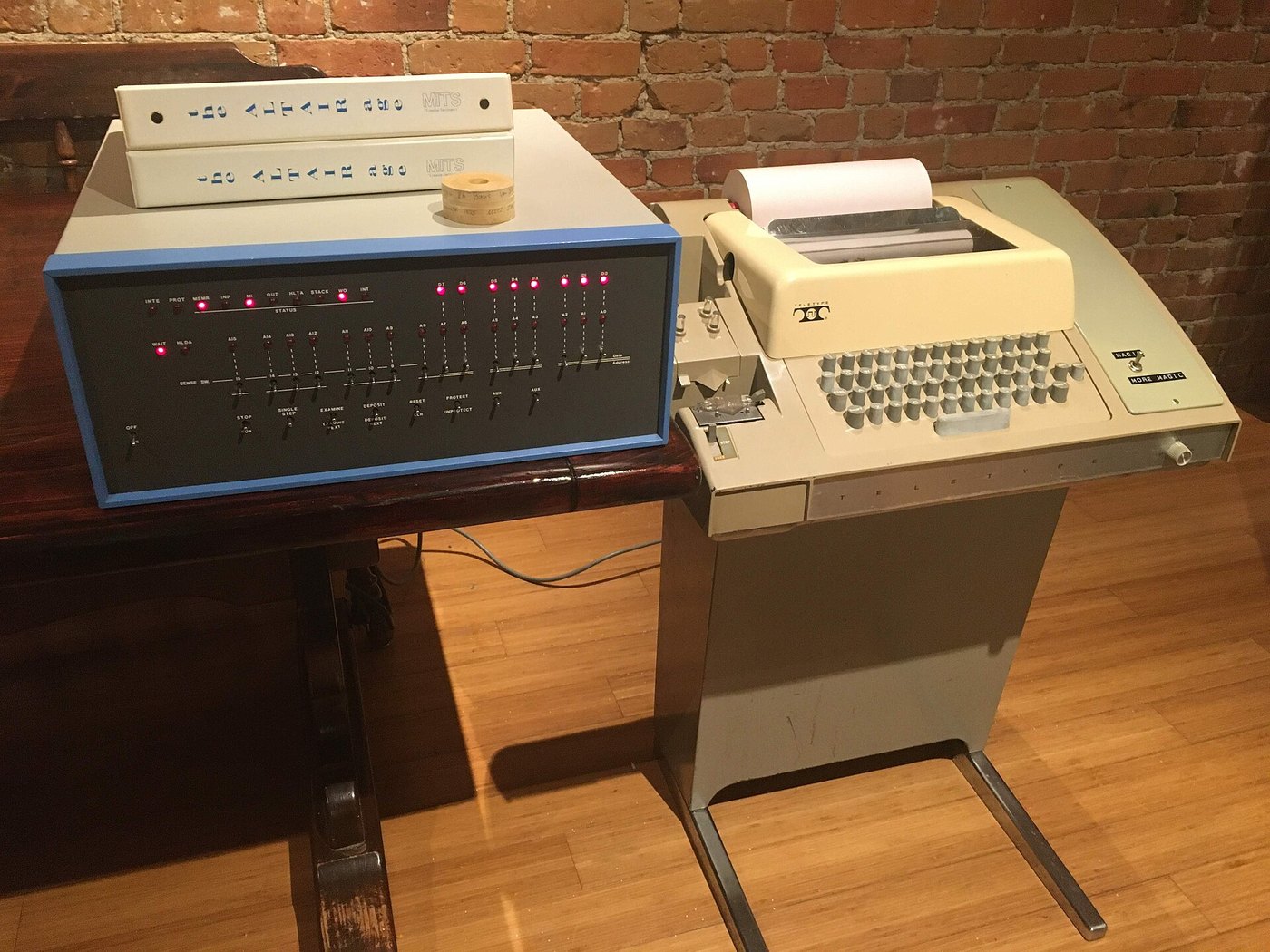
The Model 33 and Model 35 are computer terminals, and their software side is much closer to normal serial practice.
- Format. “8-level start-stop signals with 11-unit transmission pattern” at 100 wpm: one start bit, eight data bits, two stop bits, 110 baud, ten characters a second (Teletype technical data).
- The eighth bit. The code is seven-bit ASCII plus one more bit. Machines and software disagree on what it should be: Wikipedia’s account of the keyboard gives even parity, while the PDP-8 owners’ reference describes “mark parity”, the eighth bit always 1, and notes that some early PDP-8 software required it. Receiving software should ignore the eighth bit; sending software should be configurable. The Pico firmware sends it marking.
- Upper case only. A Model 33 has no lower case. Software should fold to upper case before sending.
- Tape control codes. The Model 33 code chart in the 1964 technical manual lists XON and XOFF on DC1 and DC3, “tape reader on” and off, and the assignments became the de facto standard for software flow control. DC2 and DC4 (“TAPE” on the R key, and its companion on T) switched the punch on and off on machines equipped for it. Vol 6 uses them.
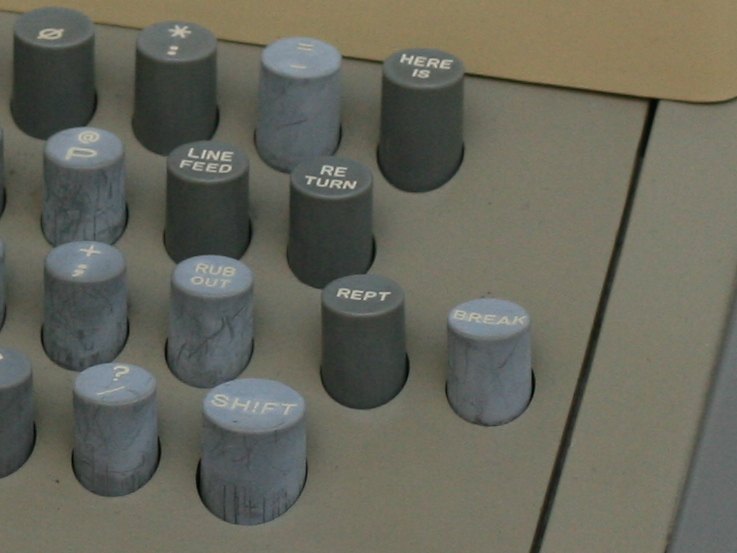
- BREAK and HERE IS. The BREAK key holds the line spacing, the long space of Vol 1 that interrupts the other end. HERE IS sends the identification coded on the machine’s answerback drum.
Because a Model 33 runs at a standard rate with a standard character format, almost any serial port can drive one through a current-loop front end. tty_send.py --ascii sets 110 baud, eight bits and two stop bits. The Pico firmware’s ~~ascii command does the same.
Next: Vol 5, a real machine on the air, and printing the ITTY news.
4.6.1 Sources (Vol 4)
- Frame and speeds: 7.42-unit Baudot character, 1.42 stop; 368 operations a minute at 60 wpm. Inside the Teletype Mechanism, Vol 1, and Teletype BSP P70.013. Model 32/33 data (60, 66, 100 wpm; 5-level 7.5-unit for the 32; 8-level 11-unit for the 33): Teletype Section 574-100-102 in Bulletin 273B, 1964 (see Vol 1 sources).
- Speeds 45.45 / 50.00 / 56.90 / 74.20 baud in usb-tty firmware: https://github.com/epvuc/usb-tty ; ITTY 100 at 75 baud and ITTY Europe at 50 baud: RTTY.COM, “ITTY.” https://rtty.internet-tty.net/itty.html
- ITA2 and US-TTY tables: Wikipedia, “Baudot code” (ITA2 and US-TTY tables), https://en.wikipedia.org/wiki/Baudot_code ; G. Heinz, “Teletype (TTY-) Code,” https://gheinz.de/techdocs/telexcode_5bit.htm ; US Navy chart, Wikimedia Commons
File:Baudot.jpg. Cross-checked in03-outputs/tools/baudot.py(self-test). - DeRamp character timing (7.0 or 7.42; “most any machine will run fine at 7.0 on a short clean loop”): DeRamp Model 15 interface user manual, https://deramp.com/downloads/teletype/Model%2015/loop%20interface%20board/User%20Manual.pdf
- HeavyMetal: authors and dates, v3.1.003 (2012-04-08), telnet port 1078, RSS, weather, METAR, eyeball labels, 600-baud support for Nagle’s adapter, stop-bit FAQ (“RYRYGYG”). https://www.albinarrate.com/index.php?option=com_content&view=article&id=51:heavymetal ; Retrocomputing Forum thread, https://retrocomputingforum.com/t/using-a-teletype-on-modern-pc-heavymetal-tty-control-program/3880
- BaudotRSS: John Nagle, README (Models 12/15/19/28; USTTY, ITA2 or FRACTIONS; Western Union machines may be ITA2; RTS motor relay; FIFO advice; GPL/LGPL; April 2009). https://github.com/John-Nagle/baudotrss
- minimodem 0.24 man page:
rtty= “RTTY 45.45 bps —baudot —stopbits 1.5”;tdd= 2.0 stop bits. https://manpages.debian.org/bookworm/minimodem/minimodem.1.en.html - fldigi XML-RPC method names (text.get_rx_length, text.get_rx, text.add_tx): pyfldigi documentation, https://pythonhosted.org/pyfldigi/xml-rpc.html ; confirm on a current build with
fldigi --xmlrpc-list. - Linux termios2 / BOTHER; USB driver behaviour: see Vol 3 sources (
ftdi_sio.c,ch341.c,cp210x.c). - RP2040 UART divisor (16-bit integer + 6-bit fraction) and PIO clock divider (16-bit integer + 8-bit fraction): Raspberry Pi, RP2040 Datasheet, chapters 4.2 (UART) and 3.5 (PIO). https://datasheets.raspberrypi.com/rp2040/rp2040-datasheet.pdf
- CuriousMarc’s Model 15 Linux login, Arduino Mega conversion, 45.5 bps: Dan Maloney, “Logging Into Linux With A 1930s Teletype,” Hackaday, 15 April 2020. https://hackaday.com/tag/model-15/ ; video https://www.youtube.com/watch?v=2XLZ4Z8LpEE
- Hugh Pyle’s ASR33 project (Teensy current-loop board, macOS and Raspberry Pi, getty/terminfo, kernel patch, paper-tape words, MIT licence). https://github.com/hughpyle/ASR33
- Model 33: 20 mA loop, 110 baud, parity and two stop bits (Wikipedia, “Teletype Model 33,” citing pdp8.net), https://en.wikipedia.org/wiki/Teletype_Model_33 ; mark parity and PDP-8 software: D. Gesswein, “ASR 33 Teletype Information,” https://pdp8online.com/asr33/asr33.shtml ; XON/XOFF code chart: Bulletin 273B, 1964; “R TAPE” keytop: Teletype Bulletin 1184B parts list (vaxbarn copy). ⟨The DC4 keytop legend was not confirmed from a photograph.⟩
- “ttycode”: not found as a program; the term appears as a variable name in FreeCalypso telephone firmware (
l1gtt_baudot_functions.h). https://freecalypso.org/hg/tcs211-pirelli/file/tip/chipsetsw/layer1/gtt_include/l1gtt_baudot_functions.h - Code:
03-outputs/tools/baudot.py,tty_send.py,afsk.py,fldigi_bridge.py;03-outputs/firmware/pico_loop/loop.pio,test_pio.py.